
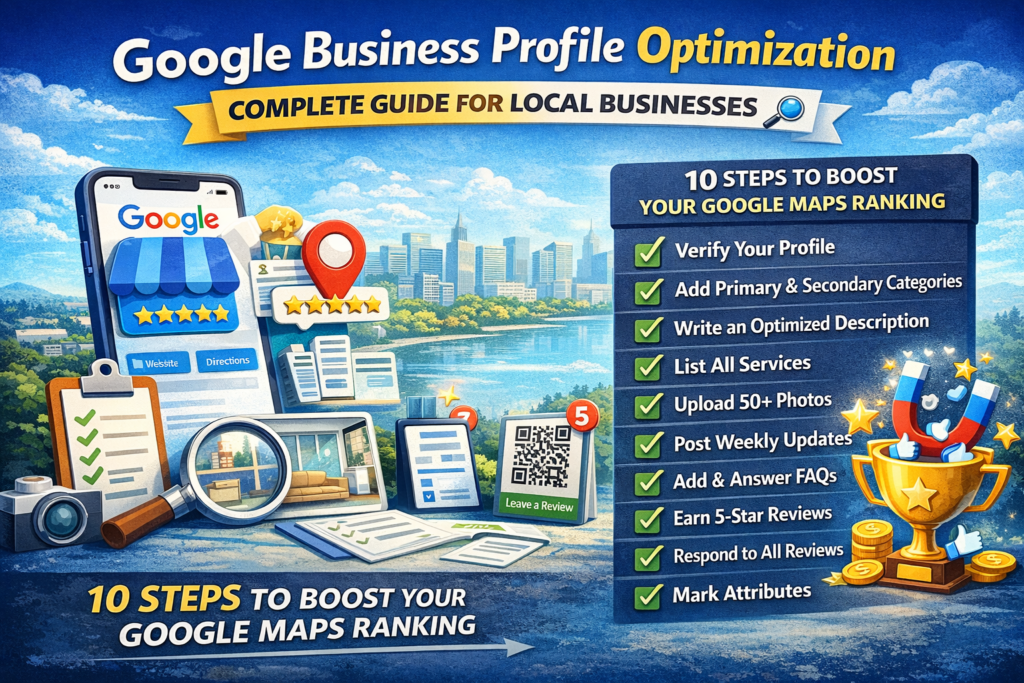
Google Business Profile optimization is the process of improving your free Google listing so your business ranks higher in Google Maps and the local 3-pack when people search for what you offer. If you’ve ever searched “restaurants near me” and saw three businesses listed below the map, that’s the local 3-pack, and getting your business there is what Google Business Profile optimization achieves.
Most businesses only fill out about 30% of their profile. That’s leaving massive visibility on the table. Here are 10 essential steps to fully optimize yours.
- Why Google Business Profile Optimization Matters More Than Your Website
- Step 1: Verify and Claim Your Profile
- Step 2: Choose the Right Primary Category
- Step 3: Write a Keyword-Rich Business Description
- Step 4: Add All Services With Descriptions
- Step 5: Upload 50+ High-Quality Photos
- Step 6: Post Weekly Updates
- Step 7: Seed Your Q&A Section
- Step 8: Build Review Quantity and Recency
- Step 9: Respond to Every Review
- Step 10: Mark All Relevant Attributes
- Common Google Business Profile Optimization Mistakes
- Frequently Asked Questions
Why Google Business Profile Optimization Matters More Than Your Website
Here’s something most business owners don’t realize: for local searches, your Google Business Profile gets more visibility than your website. When someone searches for a local service on their phone, Google shows the map pack first. Many people never scroll past it.
According to BrightLocal’s 2024 consumer survey, 64% of consumers have used Google Business Profile to find contact details for a local business. That makes Google Business Profile optimization the single highest-impact activity for local visibility.
Step 1: Verify and Claim Your Profile
Before any Google Business Profile optimization can happen, you need to claim and verify your listing. Go to business.google.com and either claim your existing listing or create a new one. Google will verify ownership through a postcard, phone call, or email.
An unverified listing is a red flag to Google’s algorithm. Verification is the foundation that everything else builds on.
Step 2: Choose the Right Primary Category
Your primary category selection is one of the most powerful ranking factors in Google Business Profile optimization. According to Whitespark’s ranking factors study, the primary category is “perhaps the most important ranking factor in the Local Pack.”
Be specific. A “Mexican Restaurant” will outrank a generic “Restaurant” for Mexican food searches. A “Cosmetic Dentist” will outrank “Dentist” for cosmetic-related queries. Add relevant secondary categories but never add categories for services you don’t actually offer.
Step 3: Write a Keyword-Rich Business Description
You have 750 characters to describe your business. Use the first 250 wisely because that’s what shows before the “More” cutoff. State clearly what you do, where you serve, and what makes you different.
Include your primary keywords naturally. If you’re a plumber in Sunnyvale, your description should mention “plumbing services in Sunnyvale” and your specific service areas. Don’t keyword-stuff, but don’t waste the space on “Welcome to our business” either.
Step 4: Add All Services With Descriptions
List every service you offer with detailed descriptions and pricing where possible. Google Business Profile optimization depends on giving Google as many data points as possible to match your business with relevant searches.
A dental clinic should list individual procedures: teeth whitening, dental implants, emergency dental care, Invisalign. Each with a description and price range. This helps you appear in searches for specific services, not just your general category.
Step 5: Upload 50+ High-Quality Photos
Photos are critical for Google Business Profile optimization. Research from BrightLocal shows profiles with abundant photos see significantly higher customer actions including calls, direction requests, and website visits.
Upload photos of your team, your physical space, your products or services in action, and your results. Name each file with SEO-friendly keywords before uploading (e.g., “best-thai-restaurant-sunnyvale-interior.jpg”). Add new photos weekly to signal an active, current business.
Step 6: Post Weekly Updates
Google Posts show up directly on your listing and send freshness signals to Google’s algorithm. Post about promotions, events, tips, new services, or seasonal offerings.
A restaurant might post weekly specials with photos. A dentist might share oral health tips. A contractor might showcase recent project completions. Consistency matters more than perfection here. One post per week keeps your profile active in Google’s eyes.
Step 7: Seed Your Q&A Section
The Q&A section on your Google Business Profile is free real estate that 95% of businesses ignore. You can ask and answer your own questions. Add the 10-15 questions your customers ask most frequently.
“Do you offer free estimates?” “What are your hours on weekends?” “Do you serve the Fremont area?” Each Q&A is additional content Google can index and use for relevance matching.
Step 8: Build Review Quantity and Recency
Review count and how recently reviews were left are both confirmed ranking factors. A business with 200 reviews from the last 12 months outranks one with 50 reviews from 3 years ago.
Build a systematic review generation process using QR codes, post-service follow-ups, and team training. Aim for 10+ new reviews per month as a baseline.
Step 9: Respond to Every Review
Responding to every review signals to Google that you’re an engaged business. It also builds trust with potential customers reading your reviews. Thank positive reviewers specifically. Address negative reviews professionally and offer to resolve issues offline.
Review response is an underrated component of Google Business Profile optimization that compounds over time.
Step 10: Mark All Relevant Attributes
Attributes are badges on your profile: “woman-owned,” “wheelchair accessible,” “free Wi-Fi,” “outdoor seating,” “veteran-led.” These help you appear in filtered searches and give customers useful information at a glance.
Go through every available attribute and mark all that genuinely apply to your business.
Common Google Business Profile Optimization Mistakes to Avoid
Keyword-stuffing your business name: Adding keywords to your legal business name (like “Best Plumber Sunnyvale | John’s Plumbing”) violates Google’s guidelines and can result in penalties.
Using a P.O. box: Google requires a real, physical address for most business types. P.O. boxes can disqualify you from the local pack entirely.
Ignoring negative reviews: Leaving negative reviews unanswered looks worse than the review itself. Always respond within 24 hours.
Using stock photos: Google can detect stock images and they provide zero trust signal. Use real photos of your actual business.
Posting inconsistently: A burst of 10 posts followed by 3 months of silence is worse than one steady post per week.
Frequently Asked Questions About Google Business Profile Optimization
How long does Google Business Profile optimization take to show results?
Initial optimization can be completed in a few days. Ranking improvements from Google Business Profile optimization typically appear within 2 to 6 weeks. Ongoing optimization with posts, reviews, and photos is a continuous process that compounds over months. Learn more about how long local SEO takes.
Is Google Business Profile free?
Yes. Creating and managing your profile costs nothing. The value of professional Google Business Profile optimization comes from the expertise and strategy applied to it.
Can I have multiple Google Business Profiles?
You can have one profile per physical location. If you have three offices, each gets its own profile optimized for its specific service area.
What’s the difference between Google Business Profile and Google My Business?
They’re the same thing. Google rebranded “Google My Business” to “Google Business Profile” in 2024. The platform and features are identical.
Want to see how your Google Business Profile scores against competitors? Get a free GBP audit and we’ll grade your profile on all 10 optimization factors above.